 Discord Cache Recovery
Deleted on Discord.Still on your disk.
Discord keeps a copy of the images, GIFs, videos and emojis you've seen. This free app finds them in that cache and gives them back as real files, with their original names and dates.
Free and open source. Works offline on Windows, macOS and Linux.
Everything it found, in one gallery you can search
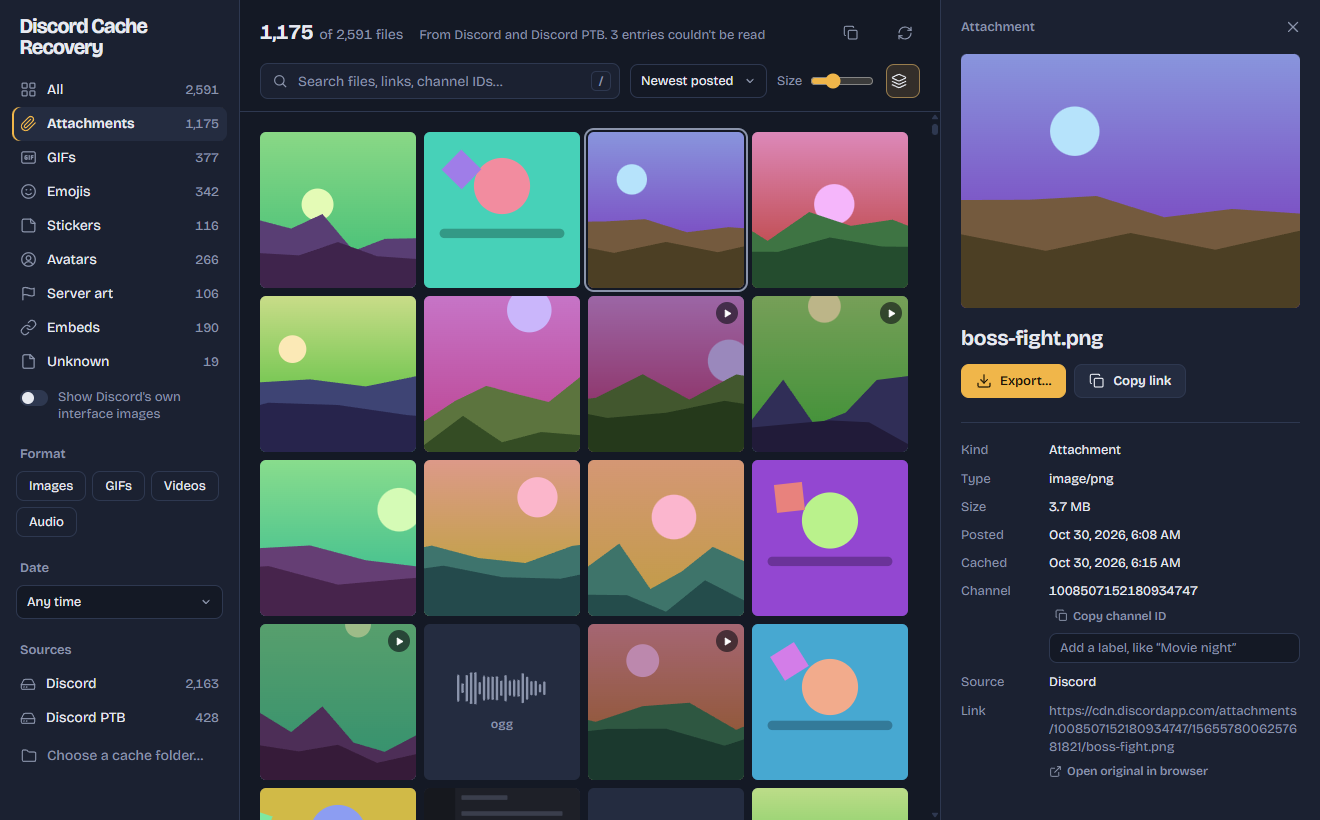
If you saw it in Discord, it might still be here
Every time Discord shows you a picture, it saves a copy in a cache folder on your computer. That copy often stays behind after the message, link or favorite GIF is gone.
Attachments
Photos, screenshots, videos and audio people posted, with their original file names.
GIFs from Tenor and Giphy
Including the ones in your favorites tab whose links now show a broken image.
Emojis and stickers
Even from servers you've since left.
Avatars, server icons and banners
Profile pictures and server art Discord loaded while you browsed.
Link-preview embeds
Images from link previews, shown with the original source link.
Videos and audio
Clips that were played or previewed in a chat.
Real names and links
Attachments come back with the file name they were posted with. Every file shows the link it was downloaded from, so you can tell where it came from.
Dates you can trust
See when an attachment was posted (worked out from Discord's message IDs) and when your Discord downloaded it.
Search and filter
Search by name, link or channel ID. Filter by kind, format, date and Discord install. Give channels your own names to search by them.
One copy, the biggest one
Discord caches the same image at several sizes. Group sizes keeps only the largest, so the gallery isn't full of duplicates.
Export with names and dates intact
Save one file or a whole selection to any folder. Exported files keep their original name and date.
Every Discord, every desktop
Discord, PTB, Canary and Development on Windows, macOS and Linux, including Flatpak and Snap. You can also open a cache folder copied from another computer.
It never touches your account
The app only reads files Discord already stored on your computer. It works with your internet switched off, so nothing leaves your computer and Discord never hears from it.
The full source code is on GitHub for anyone to read.
- Reads the cache folder on your computerThat's the only thing it does.
- Never logs inIt doesn't ask for your password and has no sign-in screen.
- Never uses your account or tokenYour login stays yours alone.
- Never talks to Discord's serversEverything happens offline, on your machine.
- Never modifies DiscordNo plugins, no injected code, no changed files.
How it works
No magic, and nothing you couldn't check yourself in the source.
Reads Discord's local cache
It finds each Discord install on your computer and opens its HTTP cache folder. It reads just the start of each file to see what it is, so thousands of files take seconds.
Pairs each file with its link and date
The cache index stores the address every file was downloaded from and when. That's where the original file name and the posted date come from.
Sorts it into a gallery
The link tells it whether a file is an attachment, a GIF, an emoji or an avatar. Duplicate sizes get grouped, and you browse, search and export.
What it can't do. It only recovers what's still in the cache. Discord removes old entries as the cache fills up, and clearing the cache deletes everything. It also can't tell which server or favorites tab something came from, though attachments do include the channel ID.
Download for your computer
Latest release on GitHub. MIT licensed.
Windows
Windows says "Windows protected your PC"? The app isn't code-signed yet, so Windows doesn't recognise it. Click More info, then Run anyway.
macOS says the app is "damaged"? It isn't; macOS blocks unsigned apps this way. Open Terminal and run this once: xattr -cr "/Applications/Discord Cache Recovery.app"
Questions people ask
Can this get my Discord account banned?
It never logs in, never uses your account or token, never talks to Discord's servers and never changes the Discord app. It only reads files that are already on your computer, so there's nothing for Discord to see.
Is it a virus? My antivirus or SmartScreen warned me.
The warning appears because the builds aren't code-signed, not because anything harmful was found. The app is open source and built from the public code on GitHub, so you or anyone else can check exactly what it does.
Why can't I find my GIF?
It can only recover what's still in the cache. Discord deletes old entries as the cache fills up, and clearing the cache removes everything. If you haven't seen the GIF in Discord for a long time, it may already be gone. Try searching by part of its link, or filter by GIFs and sort by date.
Can it tell me which server something came from?
No. The cache doesn't record servers or which favorites tab a GIF was in. Attachments do include the channel ID, and you can give channels your own names to search by them.
Does Discord need to be closed?
Usually not. On Windows, if the app says the cache is locked, quit Discord fully from the tray icon (right-click, then Quit Discord) and scan again.
My Mac says the app is "damaged". What now?
That's how macOS treats apps that aren't signed. Open Terminal and run xattr -cr "/Applications/Discord Cache Recovery.app" once, then open the app normally.